







Translations
| Code | Language | Translator | Run | |
|---|---|---|---|---|
 |
||||
Credits
 This email address is being protected from spambots. You need JavaScript enabled to view it.
LOL Energy Diagram — What's New (May 2026)
Interactive Learning Tool Update: iwant2study.org
The LOL (Initial Energy- System Schema- Final Energy , the visual layout) Energy Diagram interactive simulation has received a series of meaningful upgrades aimed at making the tool more intuitive, pedagogically richer, and easier to navigate. Here is a full rundown of what has changed.
1. Intelligent Pedagogical Tutor Panel
The most significant new feature is a real-time tutor panel that appears at the bottom of the screen and guides students step by step as they build their energy diagrams.

Rather than waiting until a student clicks "Check Answer," the tutor watches every interaction — every bar added, every energy type selected, every transfer amount set — and responds immediately with personalised feedback.
The panel uses three message types:
- 💡 Blue (Info) — a gentle next-step hint, e.g. "Add Kinetic energy to the initial (left) bar — the toy car is already moving before it speeds up."
- ⚠️ Yellow (Warning) — flags a mistake, e.g. "Remove Chemical energy from the initial state — a moving toy car only has Kinetic energy."
- ✅ Green (Correct) — confirms the model is complete and correct, e.g. "Well done! You have correctly modelled the toy car."


Students can dismiss the panel with the ✕ button, and it reappears automatically when they click Reset, so it never gets in the way permanently.
Tutor rules are currently implemented for Scenario 1 (A Moving Toy Car) and Scenario 10 (Releasing An Arrow), with the full logic of conservation of energy, forbidden energy types, and correct transfer directions all encoded.
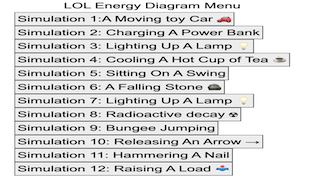
2. All 12 Scenario Pages Restored to Correct Content
A bug was added by Claude. But needed a human to teach it to change it back. I discovered in which Scenarios 2 through 12 were all displaying the content of Scenario 10 instead of their own scenarios. This has been fully corrected. Every page now shows its proper scenario description, O-diagram image, initial/final state text, hints, and answer logic: https://iwant2study.org/lookangejss/02_newtonianmechanics_7energyworkpower/ejss_model_LOLlookangSLS/index.html
| Page | Scenario | |||||
|---|---|---|---|---|---|---|
| index.html | Scenario 1: A Moving Toy Car | |||||
| index2.html | Scenario 2: Charging A Power Bank | |||||
| index3.html | Scenario 3: Lighting Up A Lamp | |||||
| index4.html | Scenario 4: Sitting On A Swing | |||||
| index5.html | Scenario 5: Cooling A Hot Cup Of Tea | |||||
| index6.html | Scenario 6: A Falling Stone | |||||
| index7.html | Scenario 7: Lighting Up A Lamp
|
|||||
| index8.html | Scenario 8: Radioactive Decay | |||||
| index9.html | Scenario 9: Bungee Jumping | |||||
| index10.html | Scenario 10: Releasing An Arrow | |||||
| index11.html | Scenario 11: Hammering A Nail | |||||
| index12.html | Scenario 12: Raising A Load |


3. "Type Of Transfer" Dropdown Auto-Close Fix
Users reported that the Energy In and Energy Out combo boxes were frustrating to use — after selecting an option such as "Propagation of Waves," the dropdown menu remained open and had to be manually dismissed.

This has been fixed. The dropdowns now close automatically the moment an option is selected, on all four transfer selectors (Transfer In ×2, Transfer Out ×2). The fix required switching the underlying event listener to run in the browser's capture phase rather than bubble phase, which ensured it fired before the native radio-button behavior could re-open the custom CSS-toggle dropdown.
4. Unique Page Titles for Analytics
Previously, all 12 scenario pages shared the same browser tab title: "Interactive LOL Diagram". This made it impossible to distinguish page visits in Google Analytics — every page appeared as the same title.
Each page now has a unique, descriptive title in the format:
LOL Diagram | Scenario 5: Cooling A Hot Cup Of Tea
This allows educators and the site owner to see exactly which scenarios students are spending time on in their analytics dashboard.
5. Energy Type Tooltips
The coloured letter labels along the x-axis — C E G I K N — now show a plain-English tooltip when you hover over them:
| Letter | Tooltip shown on hover |
|---|---|
| C | C: Chemical energy
 |
| E | E: Elastic (Potential) energy |
| G | G: Gravitational (Potential) energy |
| I | I: Internal energy |
| K | K: Kinetic energy |
| N | N: Nuclear energy |
This small addition lowers the barrier for students who are still learning the notation, removing the need to look up what each letter stands for.
6. Attribution Credit
A small credit line has been added to the bottom of all 12 pages:
Updated by lookang · 10 May 2026
This provides clear authorship and a version date, useful for teachers sharing links and wanting to know which version of the resource they are using.
Summary
These updates collectively make the LOL Energy Diagram a more self-sufficient learning tool — one that coaches students in real time, presents correct scenario content consistently, behaves smoothly on interaction, and gives educators clearer visibility into usage. The underlying simulation engine is unchanged; all improvements are to the user interface and pedagogical scaffolding layered on top.
The resource remains freely available at iwant2study.org or iwant2study.moe.edu.sg under a Creative Commons Attribution-NonCommercial-ShareAlike licence.
Sample Learning Goals
[REVISED SYLLABUS] This lesson is for Upper Secondary students taking Physics or Science (Physics) at Express or Normal Academic level [G3 Physics, G3 Science (Physics) or G2 Science (Physics)] for the 2023 syllabuses.
Pre-requisites
You should have an understanding of the following:
-
there are energy stores, e.g. kinetic, potential (gravitational, chemical, elastic), nuclear and internal, and that energy can be transferred from one store to another:
(i) Mechanically (by a force acting over a distance)
(ii) Electrically (by an electric current)
(iii) By heating (due to a temperature difference)
(iv) By propagation of waves (both electromagnetic and mechanical)
-
the principle of the conservation of energy
Objectives
At the end of this lesson, you should be able to:
-
analyse interactions between objects using energy transfer and energy stores
For Teachers
We are pleased to inform you that the following resources have been published to support you in the teaching of energy transfers and stores.
- https://www.opal2.moe.edu.sg/app/learner/detail/course/3096d4c4-81b6-42d7-8e19-330674b980f1 Introduction to Energy Transfers and Stores (Part 2)
- Digital Interactive for Energy (E = mc^2) https://vle.learning.moe.edu.sg/mrv/moe-library/lesson/view/a9921a7b-6a3e-4caa-9d50-22044648435b/cover
We hope that these resources will enrich your students’ learning.
Research
[text]
Video
Version:
Other Resources
https://www.geogebra.org/m/u2m3gnzj by Seng Kwang
end faq
{accordionfaq faqid=accordion4 faqclass="lightnessfaq defaulticon headerbackground headerborder contentbackground contentborder round5"}
- Details
- Written by Loo Kang Wee
- Parent Category: 04 Energy & Fields
- Category: 07 Energy Work Power
- Hits: 5870