







About
  |
Dipole Trajectory Wrong Model
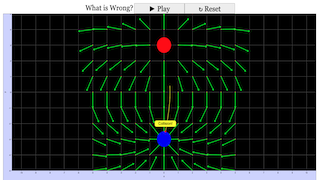
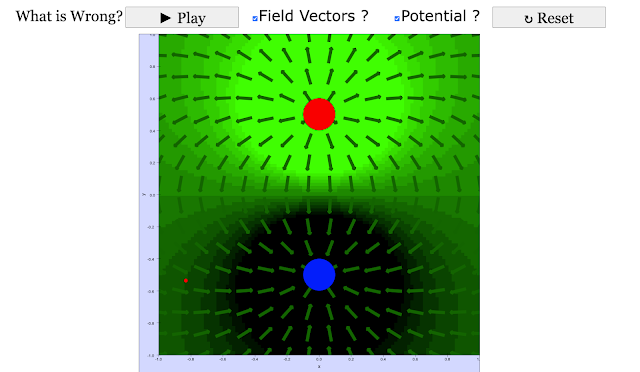
The EJSS Dipole Trajectory Wrong model shows the electric field generated by a dipole. Drag and drop the 2 dipole charges to any position to change the separation between the charges. A test charge moves in the dipole field and shows its velocity vector, but its trajectory is incorrect. Users can examine and correct the model if Ejs is installed.
Exercises:
- Run the simulation and observe the dipole field due to fixed charges (red and blue) . Also note the trajectory of the test charge.* You can move the test charge anywhere on the screen (except on top of one of the stationary charges). You can also change the separation by dragging on the charges, between the two fixed charges.
- What is wrong with this simulation? What is your evidence? Hint: Pause the simulation at several points and look at the velocity vector. Compare it with the Electric field. Should the velocity point in the same direction as the field? Why or why not?
- If you have EJSS installed, now that you have determined what is wrong with the model, correct it. You will need to go to Model->Evolution to make the changes. Describe how you changed it and how you verified your work.
References:
- Giancoli, Physics for Scientists and Engineers, 4th edition, Chapter 21 (2008).
Credits:
The Dipole Trajectory Wrong Model was created by Anne J Cox, Wolfgang Christian, and Francisco Esquembre and JavaScript version by lookang using the Easy JavaScript Simulations (EJSS) authoring and modeling tool. Exercises written by Anne J Cox, updated by Darren Tan and lookang.
You can examine and modify a compiled EJSS Model.
Using the EJSS authoring toolkit installed here, Select "A EJSS digital Library", in Library select "JS EJS model in Singapore", double click folder "05electricitynmagnetism_11efield", and double click filename "DipoleTrajectoryWrong" and click button "Download". Save the model source code inside your EJSS defined workspace/source/
; You must, of course, have EJSS installed on your computer.Information about EJSS is available at: <http://www.um.es/fem/Ejs/> and in the OSP ComPADRE collection <http://www.compadre.org/OSP/>.
Translations
| Code | Language | Translator | Run | |
|---|---|---|---|---|
 |
||||
Credits

 Francisco Esquembre, Wolfgang Christian, Anne J Cox; remixed to JavaScript by lookang
Sample Learning Goals
[text]
For Teachers
Exploring Electric Fields: Unveiling the Dipole Trajectory Wrong Model
Electric fields, those unseen forces that govern the behavior of charged particles, have long fascinated scientists and enthusiasts alike. Visualizing these fields and their effects on charged objects can shed light on the intricate dance of electromagnetic interactions. In this article, we'll delve into the intriguing realm of electric fields with a focus on the "Dipole Trajectory Wrong" model.
Unmasking the Dipole Trajectory Wrong Model
 |
https://iwant2study.org/lookangejss/05electricitynmagnetism_11efield/ejss_model_DipoleTrajectoryWrong602/ |
Imagine a scenario where you can manipulate and observe the behavior of electric fields using a virtual laboratory. This is precisely what the EJSS Dipole Trajectory Wrong model offers. This interactive simulation showcases the electric field generated by a dipole – a pair of charges with opposite signs – and invites users to tinker with its components.
Upon launching the simulation, you're greeted with a visual representation of the dipole and a test charge. The two dipole charges can be freely positioned by dragging and dropping, allowing you to alter the distance between them. While the test charge moves within the dipole's electric field, displaying its velocity vector, a subtle problem arises – the trajectory it follows is incorrect.
Engaging with the Model: Exercises and Exploration
The simulation presents a set of exercises to deepen your understanding and analytical skills. Begin by running the simulation and observing the dipole field vectors generated by the fixed charges (represented in red + and blue –). Take note of the trajectory the test charge follows, a trajectory that exhibits inaccuracies.
Curious minds are prompted to answer pivotal questions. What is amiss in this simulation? Your evidence-gathering journey involves pausing the simulation at various points and scrutinizing the velocity vector. An intriguing challenge emerges: compare this vector with the electric field itself. Should the velocity vector align with the electric field? Why or why not?
Should you possess the Easy JavaScript Simulations (EJSS) toolkit installed, you can play an active role in the evolution of this model. Identifying the flaw is the first step. Once pinpointed, navigate to "Model->Evolution" to effect the necessary corrections. Detail your modifications and the validation process you undertook to ensure accuracy.
 |
| this is a incorrect model of the dx/dt and dy/dt. Modify this to reflect the correct physics of motion |
Understanding the Nuances
It's important to bear in mind the fundamental concept of a test charge. A test charge is designed to experience external electric fields without influencing the field itself. As a result, there are no field vectors surrounding it, allowing for a focused exploration of its trajectory.
Acknowledgments and Further Exploration
The Dipole Trajectory Wrong Model is the product of collaborative efforts. Anne J Cox, Wolfgang Christian, and Francisco Esquembre are credited with its creation, with the JavaScript version crafted by lookang using the EJSS authoring and modeling tool. The model has evolved over time, with exercises updated by Anne J Cox, Darren Tan, and lookang.
For those intrigued by the inner workings of the model, you're granted the opportunity to dissect and modify its compiled form. Using the EJSS authoring toolkit installed https://gitlab.com/ejsS/JavaScriptEditor/release", Select "A EJSS digital Library", in Library select "JS EJS model in Singapore", double click folder "05electricitynmagnetism_11efield", and double click filename "CoulombForceWrong" and click button "Download". Save the model source code inside your EJSS defined workspace/source/</p> . To engage in such explorations, EJSS must be downloaded and unzipped on your computer.
For a deeper dive into EJS and its capabilities, information is readily available at [http://www.um.es/fem/Ejs/http://www.um.es/fem/Ejs/" http://www.um.es/fem/Ejs/) and within the OSP ComPADRE collection at [http://www.compadre.org/OSP/](http://www.compadre.org/OSP/).
In Conclusion
Electric fields, often unseen but ever-present, shape the behaviors of charged particles. The Dipole Trajectory Wrong Model, despite its inaccuracies, opens a virtual window into the intriguing world of electric fields and their interactions. As you navigate the simulated landscapes and unravel its mysteries, you're embarking on a journey that mirrors the curiosity and exploration inherent to scientific discovery.
email: This email address is being protected from spambots. You need JavaScript enabled to view it. for the password to the Corrected version
- ejss_model_CoulombForceWrongCorrectPassword.zip
- ejss_model_DipoleTrajectoryWrongCorrectPassword.zip
- ejss_model_CoulombForceCorrectDarren.zip
- ejss_model_DipoleTrajectoryWrongCorrectDarren.zip
Research
[text]
Video
[text]
Version:
- https://weelookang.blogspot.com/2023/08/exploring-electric-fields-unveiling.html
- https://www.compadre.org/OSP/items/detail.cfm?ID=9964
Other Resources
[text]
end faq
{accordionfaq faqid=accordion4 faqclass="lightnessfaq defaulticon headerbackground headerborder contentbackground contentborder round5"}
- Details
- Written by Loo Kang Wee
- Parent Category: 05 Electricity and Magnetism
- Category: 01 Electric Field
- Hits: 4094